Mostrar mensagens com a etiqueta Francisco Barros. Mostrar todas as mensagens

Week #12: A late goodbye

Sem comentários

Fellow readers,

This report is likely to be my last post on this blog. The writing experience lasted for approximately three months of my life. Just a few days back on the 26th of May, we had the first fully online MOJO event in history; the day was overall a joy. Our team participation involved three componentsSee players testing our game and giving us direct feedback about their experiencePlaytesting other teams' games and watching online streams where the developers and artists of each team talked about their developing experience, their goals, and what they would have done differently.

Our interview was set for 12:30PM, and overall, the conversation went well. We answered the questions honestly and talked about our game very naturallyThe only unfortunate part, as mentioned by other colleagues on their blog posts, was that the wrong trailers and gameplay videos were displayed on the event. The trailer presented was a 720p initial draft made by Sofia Santos, and the final trailer was way better. In this trailer, the sound was masteredThe image quality was 1080p, and there were subtitles for people who had trouble understanding spoken English and included some hero shots of our game, including levels that were not used in the event. This happened because of me. With the hurry to deliver everything by the end of the 25th of May, I accidentally submitted the trailer we had stored on GitHub. Instead, I should have provided the version I had stored locally, which could not be uploaded to GitHub because it was larger than 100MB. However, when it comes to the wrong gameplay trailer being displayed, it was the streamers' errorWe submitted a way better version at approximately 10:30AM and signaled this at least twice throughout the morning. The improved version better displayed how the game should be played and enjoyed, instead of being a rough speed-run throughout the level. Alas, we are all human. If you are curious you can check the videos below. The first is the final game-play trailer and the second is the final presentation trailer!


Overall, this course and the MOJO event made me learn a lot about game developmentAlthough it gave me lots of hard work and ultimately set me back on my thesis progress, I do not regret it for a single second. I even enlisted as a volunteer for Game Dev Técnico. Wink Wink. I also got to make new friends in other universities, and I am not regularly going out with one of them! For lack of better words, this was a 'game' changing experience! See what happens when game development joins together an engineer and an artist:

Figure 1 - Francisco and Sofia find happiness in each others' company
I wish you all the best,
See you next time.


Weak #11: re-creating the dialogue system, more HUD, better information.

Sem comentários


Figure 1 - Tutorial level, designed by Rafael Ribeiro

Squad...

The road so far was hard and full of perils, but the end boss is yet to be defeated. As MOJO approaches, we still need to create two exciting and playable levels, including a tutorial so that players can experiment with our game one "final" time. After that, we need to create a game-play trailer that is about 8 minutes long. But that's what we need to accomplish in the next 24 hours.

What I've done this week however, is another story.

I had to recreate the dialogue system, which was outdated, malfunctioning in a few aspects. Still, the most notable change was in the interface and how the player engages in the selection. The number of possible choices is still limited to three dialogue options. However, it is no longer required that the tree has precisely three possibilities. This should make the dialogue system less linear, and perhaps more exciting. The underlying system can easily be upgraded to have more choicesStill, the HUD would be cluttery, hence the imposed restrictionsWe went from a cycle and mouse click to, W A D keypress selection, or alternately using arrow navigation and press enter selection.

Figure 2 - New dialogue HUD example. Following artists specification.

I also created the credits, intro, and trailer scenes in the game using our art student, Sofia, products. I also used her posters on our propaganda poster prefabs.

Figure 3 - Propaganda posters, by Sofia Santos. There is no better Art  collaborator.

I created a system that allows the user to select between game-pad and mouse + keyboard HUD at any time by accessing the pause menu or the main menu. The goal is to help the user better understand what he is doing. On that note, we now use icons to specify key-binds within the game instead of hardcoded strings. See Figure 2. Ideally, I would have liked for this to be dynamic concerning the "last used" device. Unfortunately, with the way we implemented the input controls, this would not be easily achieved in short notice.

Finally, I created a tutorial HUD and system that allows Rafael to give instructions to the player has he navigates the tutorial corridor, shown in Figure 1.

I could go on, but I have the stuff to do.

See you in two days.

Week #10: Heatmaps, Maptracing and lots of HUD.

Sem comentários
Figure 1 - Heatmap and Maptracer combined

Hello fellow followers,

Figure 2 - A small part of the new HUD.

Throughout the 10th week I have been busy constructing Heat-maps and Map Tracing to use during the play-tests of the game during MOJO. Once again I did refactoring to improve the performance of the game but my best work so far this week was to work directly with the arts 
student Sofia, to integrate her HUD and menu on our scripts. As well as creating with her a custom cursor and adding it to our game. She also made one .exe logo for us.

Figure 3 - Game Over Screen for defeat case. Victory is similar.
I also implemented a loading screen to make smoother transitions and which asks the player not to close the game while we write log files to disk and upload them to the cloud as backup. Apart from these I haven't done much else. This week's post has been short and there is not much more to say, mostly because doing the heat map and the map tracing took up most of my time.

See you soon at Mojo!

Figure 4 - Uploads to cloud, checked.

Week #9: More dots!

Sem comentários
Figure 1 - New Overlay HUD, New Appreciatable Art, New Background Blur.
Hello gang,

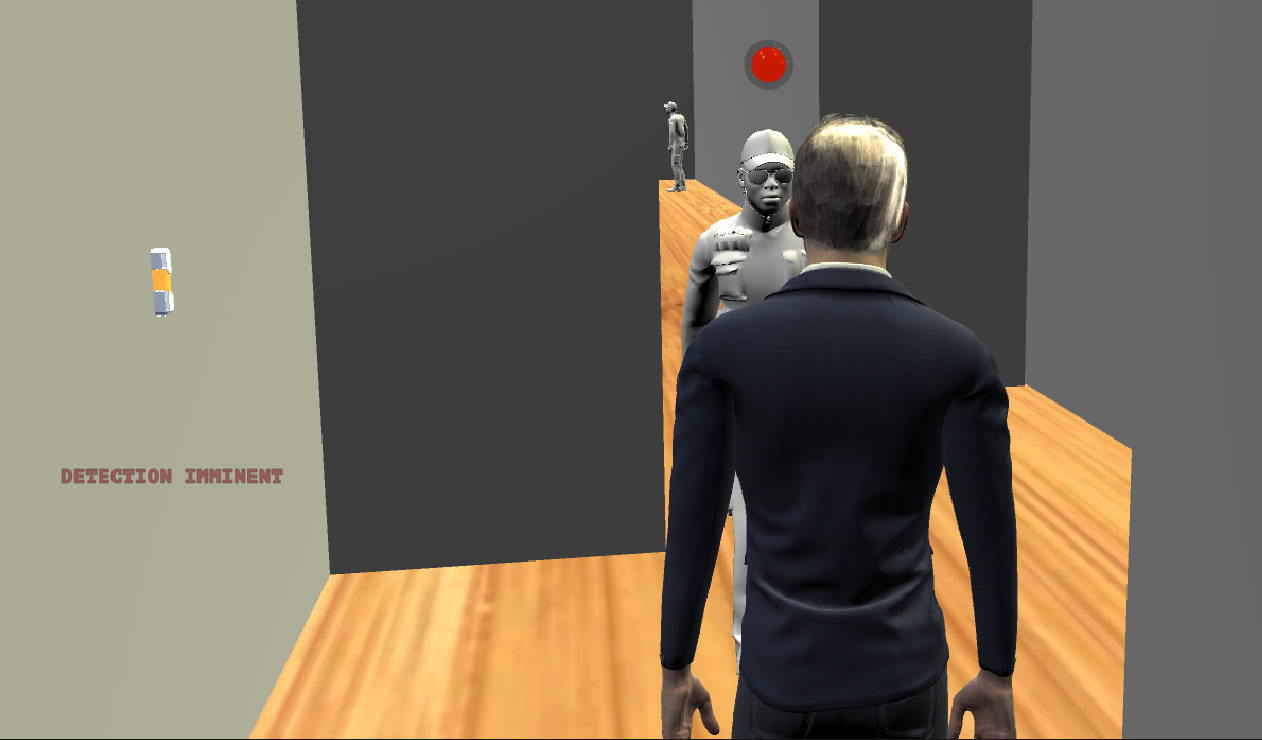
I feel like I've been hit by a train. The development efforts really skyrocketed this week. I am so tired; I will keep it short. I've corrected an endless amount of bugs in the interaction system, in the pause game mechanic, in the HUD. That was the part that came naturally to me, as I am usually very proficient at fixing last-minute issues. The hard part included redesigning the Tooltiping System to allow more use cases, making it more flexible and more informative. I then connected the tool-tip system with Rafael's AI, so that the player knows he is being detected without using weird lanterns, even if the threat is not in his line of sight. Implementing an enter in closet mechanic, so the player has more places to hide, apart from usual WASD collider abusing. Applying a hug the wall mechanic, which was supposed to be a quick time event to perform last-second detection saving, but after extensive testing ended up being the traditional stuff that can be performed anywhere, a hit box with cover tag is available. I also brainstormed with Rafael, ways of improving his AI, which is right now still a work in progress. Cleaned up old code, increased performance on existing ones. Cleaning also included making ready-to-use prefabs both for decorative as well as functional purposes.

Figure 2 - New Cover Mechanic
Figure 3 - New Detection Hints


Many other things I do not remember right now. For example, a fade screen animation, to compensate for the fact that player changing clothes is just an instantaneous model switch Another blur background animation to be used along with newly created interactable classes that allow the player to appreciate art posters, read books, among others.
That's "basically" it — bye guys.

Figure 4 - More prefabs, more prefabs...

Week #8: Fix, Improve, Repeat

Sem comentários


Personally, this week has been focused on improving existing systems and fixing known issues. I adjusted the reusability of the interactable systems. I applied it to dialogue characters so that they are triggered when the player desires and not when he accidentally passes through a collider somewhere on the scene. After making talking NPC's part of the interactable system, I realized the outline animations had a bug. The package we used and previously adapted from the asset store did not support objects using multiple composed mesh renderers. After some reverse engineering, I found an easy and effective solution that required no hammering, and now the outline works with complex NPC Humanoid models as well as it does with simple geometries like cubes. The code could be more efficient, but when I tried fixing that issue, I started suffering from null pointer exceptions. I am aware of unity's lifecycle system, and I know how to use Awake, Start, etc.. Still, somehow a list I saw being populated in Start method with desired non-null objects using breakpoints and Rider's debugger became empty when accessed later. No big deal, the current code works, it's not as efficient or elegant as I would like, but works and does not cause any performance issues. I might look into this at some other point in time.

Figure 1 - Outlining Humanoids and other complex Shapes
Other tasks included extending the menu system with the capability of unlocking Levels as the player progresses through them in-game. Meaning that he can only access Level 2 if he completes Level 1, and so on. This mechanism can be bypassed by manually altering the JSON file in the streaming assets folder for testing. Still concerning the menu, it now includes an option to modify the sensibility using a slider to the liking of the player. Some play testers complained about how jaggery and fast the free look was, but with this functionality, it should no longer be an issue. Player preferences are kept through his sessions, and he does not need to customize his game every time he executes it.

Figure 2 - Better tool-tips
Other UI improvements include presenting the key the player should press to interact with or grab an item that is highlighted in the world. While this is not an essential feature for players who dedicate some time to the game, as they start associating the keys to each action, newer players will feel lost and did so in the play tests, if they are not presented the key binds during their session. 

Figure 3 - Before Exchanging the Player Model
Figure 4 - Exchanged Player Model
Finally, I implemented one required feature tied with the core of the game. Which is allowing the player to select and change is disguise. Two solutions were available. Exchange the skin mesh renderers, or change the player model at runtime. The first approach yields better results but has many prerequisites that the team is not capable of fulfilling, e.g., clothes would need to be explicitly designed for the models, which is not possible since we are using mixamo models and they don't bring any replaceable clothes. I still tried to make them work by reusing clothes from different models, but this solution did not work very well, because not all dresses were made alike. By this time, the 3D Artist Humberto replied to my consultation and agreed that the second approach was more comfortable and faster to implement for both of us. Hence, right now, exchanging clothes means that we are changing the player model, which has the downside of having a different body shape and a different faceThis, however, should not be an issue once we start using our own models instead of free ones downloaded from the web.

Week #7: HUD and Main Menu, et al.

Sem comentários
Figure 1 - Interaction System Highlight Demo. 
Howdy,


This week I've been working on the game's UI and HUD. I have implemented two different ways of displaying game objectives to the user. On top of that, I improved the interactions systems that I was working on last week; I made tooltip texts more responsive, accurate, flexible, and better looking. Not only to the end-user but also to the remaining developers. I also cleaned and fixed bugs, ensuring that pieces fit together and maximizing reusability. Making an object interactable is as simple as giving a new script, and if you need to change what happens during the interaction, you simply override the Interact method. I completed the migration to unity's most recent Input System and enforced all components to use it, as some colleagues opted to keep using an old, outdated system. By applying this enforcement, the users can play the game using the Keyboard and Mouse, as preferred by the focus group, but they can equally use a Playstation or Xbox controller with no loss of functionality.

Figure 2 - Main Menu v1.0
Finally, I have implemented the first version of the Main Menuwhich allows navigation between different submenus, using the mouse, controller, or keyboard arrows, and highlights selected items and pressed items differently. This menu reads the GameLevelProperties to ensure the player does not play levels before completing their precedents unless he modifies the game file manually (hacks) in the Streaming Assets folder.

Next week I will be fixing some of the issues mentioned by playtesters a few days ago, improving the options menu, fixing more bugs, and extending the interaction system to implement more specific objects instead of generic ones. I will also work with Rafael in order to integrate this system into the enemies' detection mechanism.

See you then,
Francisco

Week #6: implementing the initial interaction system

Sem comentários
Figure 1 - Preparing the interaction system for selection testing

Hello lads,

The development of the game is starting to take a quicker pace. Andreia has been busy constructing a better camera system for our game using a well know library; Rafael has been implementing behavior trees and more animations to correspond to them and, I've been developing the interaction system. This perhaps the most natural week for me to describe, although it's been the hardest to work on. 

Before implementing the interaction system, I refactored the entire project concerning the user input systemWe now use version 1.0.0 of Unity's newer InputSystem instead of the Legacy system. This has the benefit of enabling even more comfortable keypress configuration and incomparable cross-platform support. It also delegates input handling in cleaner, more efficient waysI then passed to my main task, the interaction system, lifted the requirements around it, and its purposes in our game. I first programmed an initial version of an inventory, to which I can add and remove items, but not yet visualize or select them, since that is not a priority - and it's likely not going to be anytime soon. I also wrote the interface for all interactable entities in the game and implemented the base class. Any NPC to which a player may talk to, an item he may pick or door he may open, needs to inherit from this base class and do any extensions when required. This interactable class facilitates implementing different behaviors, effects, bonuses, and penalties for interactables being interacted with. It's particularly useful to make the guards' local and global suspicions towards the player. As of right now, we have three ways for our focus group to test the interaction system; they can opt to use a ray cast selector, a proximity selector, or a cyclic selector for items that are on the ground. These resemble the pick-up mechanics found respectively in Hitman 2, Splinter Cell: Blacklist, and the quick weapon switch mechanic found in any of the Counter-Strike titles.

Starting this week and going forward to the next one, I will be working on the game's UI and HUD. In particular, I will implement two different ways of presenting game objectives to the player, the menu system which was already sketched by our arts' colleagues and the interactables nearby and interactable selected highlighting and tool-tips. This plan is of course, subject to change.

See you next week,
Francisco
© all rights reserved